swarmexec

swarmexec (swarm-exec) — docker exec, logs and port-forward for Docker Swarm

Every container in your Swarm, one terminal away.

exec, logs -f and port-forward into any task on any node — what kubectl gives you on Kubernetes — with no SSH to the node and no published port. A k9s-style UI across all your clusters, and a stack diff and a security gate before you deploy.

swarmexec is the operator's day; docker stays the primitive underneath. Use it for the daily round — logs, a shell, a forwarded port, a checked deploy — and keep docker for the canonical answer when you need one. What each one is for.

Apache-2.0 with no node limit and no edition above it. No telemetry: the binary sends nothing about you or your cluster, and only asks this site once a day whether a newer release exists (details, and how to turn it off; this website does count visits). Install · How it compares · Source on GitHub

 curl -fsSL https://swarmshell.dev/install.sh | sh

Linux and macOS; checks the release checksum, never uses sudo (read it). Homebrew, Scoop and Windows: more ways to install.

The manager says running. Ask the node.

In a Swarm the manager knows where every task is scheduled. What is true inside the container — its healthcheck, its shell, a port nobody published, the volume on its disk — lives on one node. swarmexec puts a small agent on every node and asks it directly, from the terminal you are already sitting in.

your terminal context prod
manager Docker API
node-2 agent :9443
node-3 agent :9443
node-4 agent :9443

manager · task list for web

web.1   node-2   running
web.2   node-3   running
web.3   node-4   running

agents · the status line each node already reads

node-2  Up 3 days (healthy)
node-3  Up 2 hours (unhealthy)
node-4  Up 3 days (healthy)

swarmexec ui · the tree row

▾ web  replicated  3/3  nginx:1.27.2  ✖ 1 unhealthy

1 of 3 checked containers unhealthy: orange, like a partial rollout.

Swarm's task state reads running while its container fails every probe, so the verdict has to come from the node. It rides along with the status line the agent already reads for resource usage — no extra request.

Instead of SSH and docker exec

Docker has no docker service exec; the request has been open since 2016 (moby#27552). So the way into a task is a lookup on the manager, an SSH session on whichever node runs it, and a second lookup there. Every time, and for every operator who needs it, an account on every node.

A shell in replica 2 of web

without

$ docker service ps web -f desired-state=running  # which node?
$ ssh node-3
node-3$ docker ps -f name=web.2                     # which container?
node-3$ docker exec -it 3f9a2b1c9e04 sh

with swarmexec

$ swarmexec exec web.2 -- sh
Full recipe →

The database port nobody published

without

$ docker service update --publish-add 5432:5432 db
# …which changes the stack and opens the port on every node,
# or a socat container on the overlay network, published, then removed again

with swarmexec

$ swarmexec port-forward db 5432   # localhost:5432, nothing published
Full recipe →

Which node holds which volume

without

$ for n in node-1 node-2 node-3; do ssh $n docker volume ls; done

with swarmexec

$ swarmexec volume ls   # every node, and who uses each volume
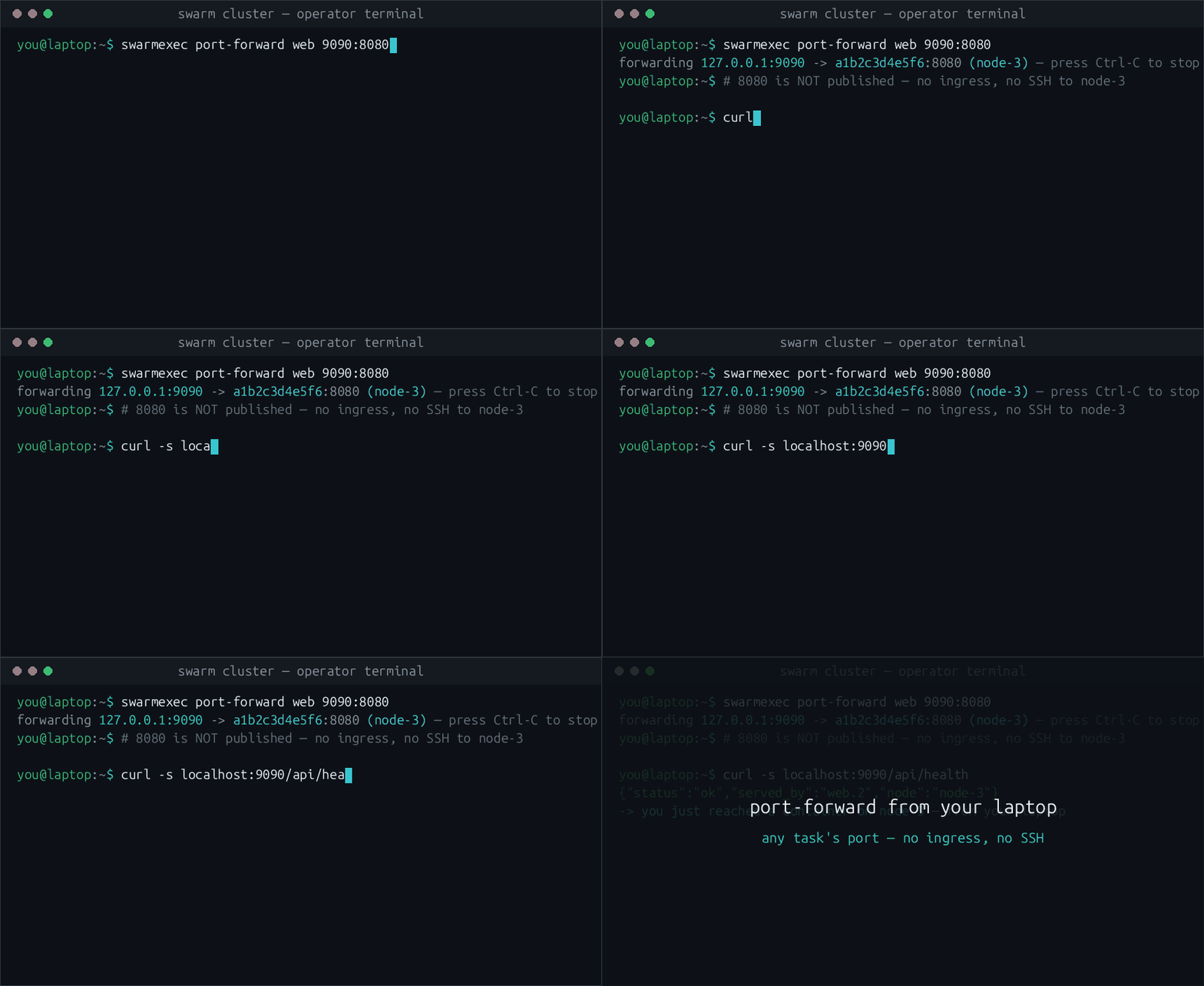
A terminal: swarmexec port-forward opens a local port onto a container port of a task on node-3, and a plain curl against localhost answers through it — no SSH and no published port.
A forward to a task on another node, then plain curl localhost through it.

$ swarmexec ui  → Networks → n

The two overlay mistakes nothing else reports

Docker addresses a new overlay out of 10.0.0.0/8 and sizes it for a 1500-byte link. On a cloud private network both are wrong at once: the nodes already live in 10.0.x.y, and the link carries 1450. Neither failure announces itself. The first hands a container an address a node already owns; the second drops exactly the packets too big to fit, which reads as a slow connection rather than a broken one.

Before it creates anything, swarmexec proposes a subnet that collides with nothing — not the node addresses, not the configured underlay, not an existing network, not the swarm's default pool — and the MTU the overlay should carry. The agents report their nodes' own link MTUs, so the number is read off the wire rather than assumed.

com.docker.network.driver.mtu states the underlay's MTU and Docker subtracts 50 bytes of VXLAN overhead from it — so writing in what you want inside costs 50 bytes a packet and looks right. It proposes and does not substitute: whether an overlap is acceptable is your call, but the moment after the network exists is the moment it can no longer be changed without detaching every service from it.

Network "db": address and MTU check
⚠ 10.0.1.0/24 contains host IPs: 10.0.1.2 (node-1), 10.0.1.3 (node-2)
⚠ frames of 1500 bytes (1450 inside the overlay) do not fit a
  1450-byte underlay: the packets that exceed it are dropped
  without an error

→ suggested subnet 10.40.0.0/24 — clear of 3 node address(es),
  the configured underlay, 11 existing network(s)
→ set MTU 1450 (the underlay's own), which gives containers 1400 bytes

Create anyway?
The agent runs as a global service, one task per node, and swarmexec reaches it through your Docker context, including an ssh:// one behind a jump host. Operators need no account on the nodes. If you have SSH to every node and want nothing deployed on the cluster, d4s is the better fit — see the comparison.

Four things you will not find elsewhere

Exec by itself is no longer rare — Portainer and Komodo have it in the browser, d4s over an SSH tunnel, and swarmcli's Business Edition behind an mTLS proxy. These four have not turned up in any of them, nor in Swarmpit, Arcane or Dockhand.

$ swarmexec stack diff web.yml

A diff of what would change, not of how it is spelled

A deployed stack carries things your file never had: the digest the daemon resolved, its own restart and update defaults, the stack name prefixed onto every network and secret. Compared as text, that is a page of differences for a stack that is exactly in sync — and a tool that teaches you to ignore its output.

swarmexec runs the file through Docker's own compose loader and converter, the code docker stack deploy uses, and reduces both sides with the same function. The question it answers is would deploying this change anything. Exits 1 on a difference, like git diff --exit-code.

An export is a description, not a backup: secret values are write-only in the engine API and volume contents live on the nodes, so both are declared external, and the output says so under Not compared.

The file says
Compared
swarmexec stack diff web.ymlexit 1
--- deployed stack web
+++ web.yml
@@ -1,6 +1,6 @@
 services:
   web:
-    image: nginx:1.27.1
+    image: nginx:1.27.2
     networks:
       - front
     deploy:

One line changed, so one line is reported.

$ swarmexec stack deploy web.yml --check

A scan of the spec, before anything is created

Eight analyzers read each service's spec — the spec the manager already returned, so nothing runs inside your containers. stack deploy converts the file into the very ServiceSpec values it would submit and runs the same eight, so the gate, the 🛡 in the tree and the report can never disagree.

Anything above informational stops the deploy and asks. --yes means do not ask, not ignore the findings — it still refuses. To deploy anyway you type --despite-findings.

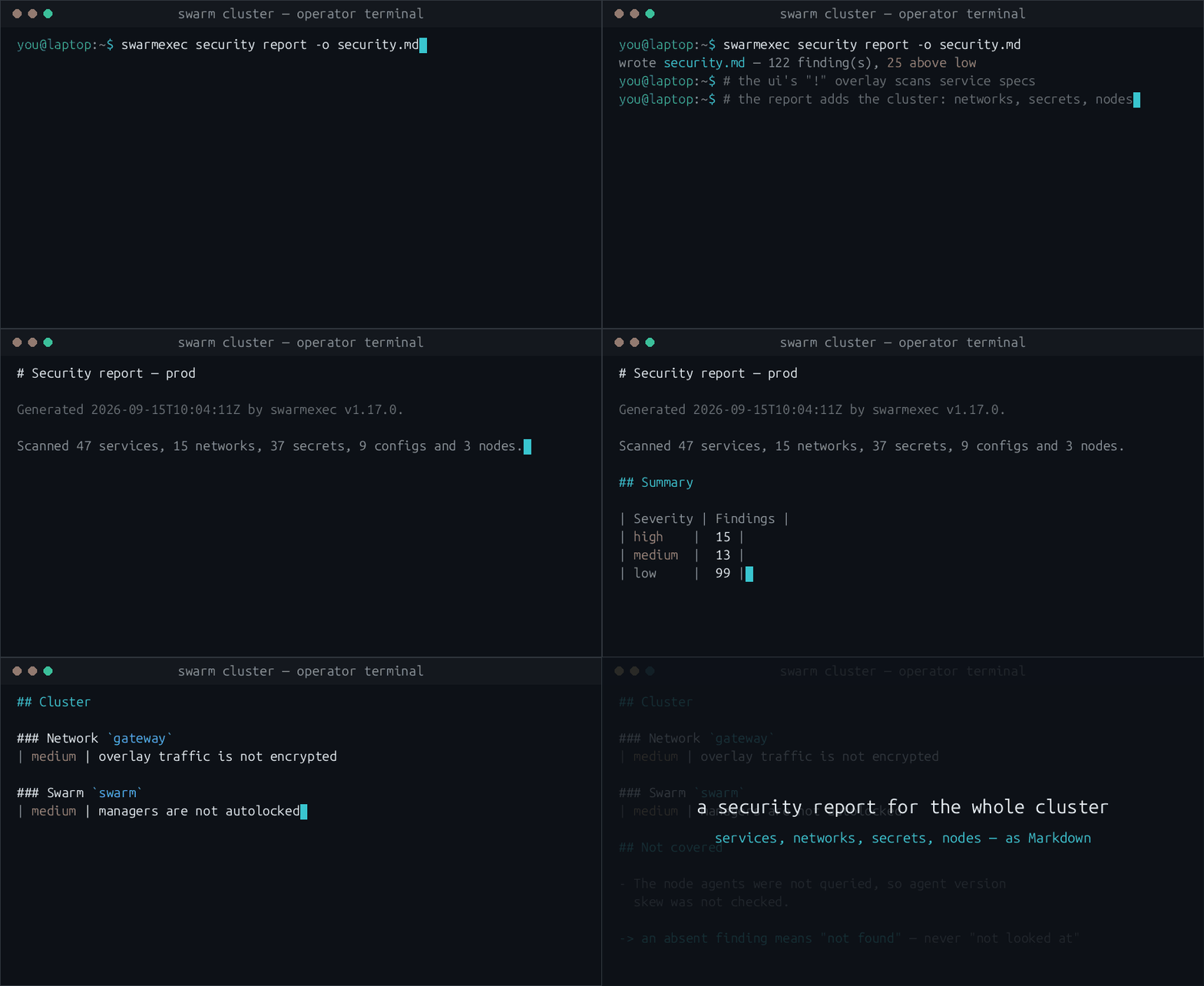
security report adds six checks no single service can answer: unencrypted overlay networks, managers without autolock, agent version skew, overlay addresses hardcoded into a service's configuration, secrets and configs nobody references — and names what it could not reach, because silence in a security report reads as an all-clear.

Tap a line to change it. The output is the checker's, rule for rule.

services:
  api:
swarmexec stack deploy web.yml --checkexit 1
1 of 1 service(s) flagged in web.yml:

  api
    high    Docker socket mounted in — the Docker socket is bind-mounted at /var/run/docker.sock; anything in this container can start a privileged container on the node, i.e. it is root on the host (read-only does not help — the socket is an API, not a file)

Also found, and not printed because it is informational: image not pinned.

$ swarmexec logs -f web.2

Logs that outlive the container

A rolling update, a restart or a reschedule replaces the container under the stream. The client re-resolves the slot through the manager it is already talking to, dials the new node's agent and prints one dim line where the old stream ended. It waits about 30 seconds for a replacement to be scheduled, and stops cleanly if the service is removed.

The detection has to live in the client: each agent is local to its node and cannot see a replacement that happens at the swarm level.

swarmexec logs -f web.2
10.0.1.7 - - "GET /healthz HTTP/1.1" 200 2
10.0.1.9 - - "GET /api/cart HTTP/1.1" 200 812
── container replaced; reconnected to 7f3a2b1c9e04 on node-2 ──
10.0.1.7 - - "GET /healthz HTTP/1.1" 200 2
10.0.1.4 - - "POST /api/cart HTTP/1.1" 201 64

Compared against the projects' own repositories, READMEs and documentation on 2026-11-19.

The whole command surface

Every command honours your Docker CLI context, including an ssh:// one behind a jump host. Connections to the same host share one OpenSSH transport, so only the first one authenticates: doctor on a three-node cluster behind a jump host went from 8 authentications and 3.6 s to 2 and 1.0 s.

Provision

init
deploy the agent as a global service, create the shared secret, write a matching client config
init --force
re-roll the agents and keep the secret, so every client keeps working
down
remove the agents again; your client config is left alone
doctor
check the manager and every agent; non-zero if one is unhealthy or too old

Reach in

exec <target> -- sh
a shell or a one-off command in any container; the remote exit code comes back verbatim
logs -f <target>
follow across replacement; --log-format auto, --min-level, --grep
port-forward <target>
a local port onto a container port that is published nowhere
ps
every task and the node it runs on, from the manager alone
status
one screenful: nodes, services and what is not converged
stats
live CPU and memory per container, measured on the node itself
mcp
an MCP server: your AI assistant reads status, logs and stack diffs of the services you label

Node-local objects

volume ls
volumes across all nodes, with which nodes hold each and who uses it
volume rm
remove a volume on every node that holds it, or on the nodes you name
node ls / update
every node with its reserved CPU and memory; set labels and availability
node prune
reclaim images, containers, volumes and build cache per node — and prune-schedule to have the nodes do it on their own
context
create, list and switch Docker contexts, in docker's own store
config show
the effective merged config, secret masked

Stacks and safety

stack export
read a deployed stack back out as compose-shaped YAML
stack diff
compare a file against what is deployed; exits 1 on a difference
stack deploy
check the file, then apply it; --check gates a pipeline
stack ls / rm
the stacks in the cluster; remove one with everything labelled into it
wait
block until a deploy has converged — --healthy too; exits 1 on a paused update or a rollback
security check
gate a stack file before it is deployed; exits non-zero on a finding
security report
a Markdown audit of services, networks, secrets and nodes
secret rotate
roll a Docker secret through the services that use it, one at a time, with a rollback when one does not come up

A target is web (the service's running task), web.2 (a replica slot), xxh8k1… (a task ID) or 3f9a2b… (a container ID). A bare service name with several replicas is ambiguous: exec offers a numbered list when it is interactive, port-forward prints the candidates and exits rather than pick for you, and logs follows every replica at once.

For your AI assistant. swarmexec mcp is a Model Context Protocol server: Claude Code and other assistants read status, tasks, logs and stack diffs through the same agents — but only of services you opt in with the service label swarmexec.mcp.enable=true; every other service does not exist for them. It has no tools that change a service; reading logs needs swarmexec.mcp.logs, running a single command needs swarmexec.mcp.exec. Register it with claude mcp add swarmexec -- swarmexec mcp — the recipe.

Put together into whole workflows — debugging a crash, rotating a secret, gating a deploy in CI — in the recipes.

The same cluster, as one screen

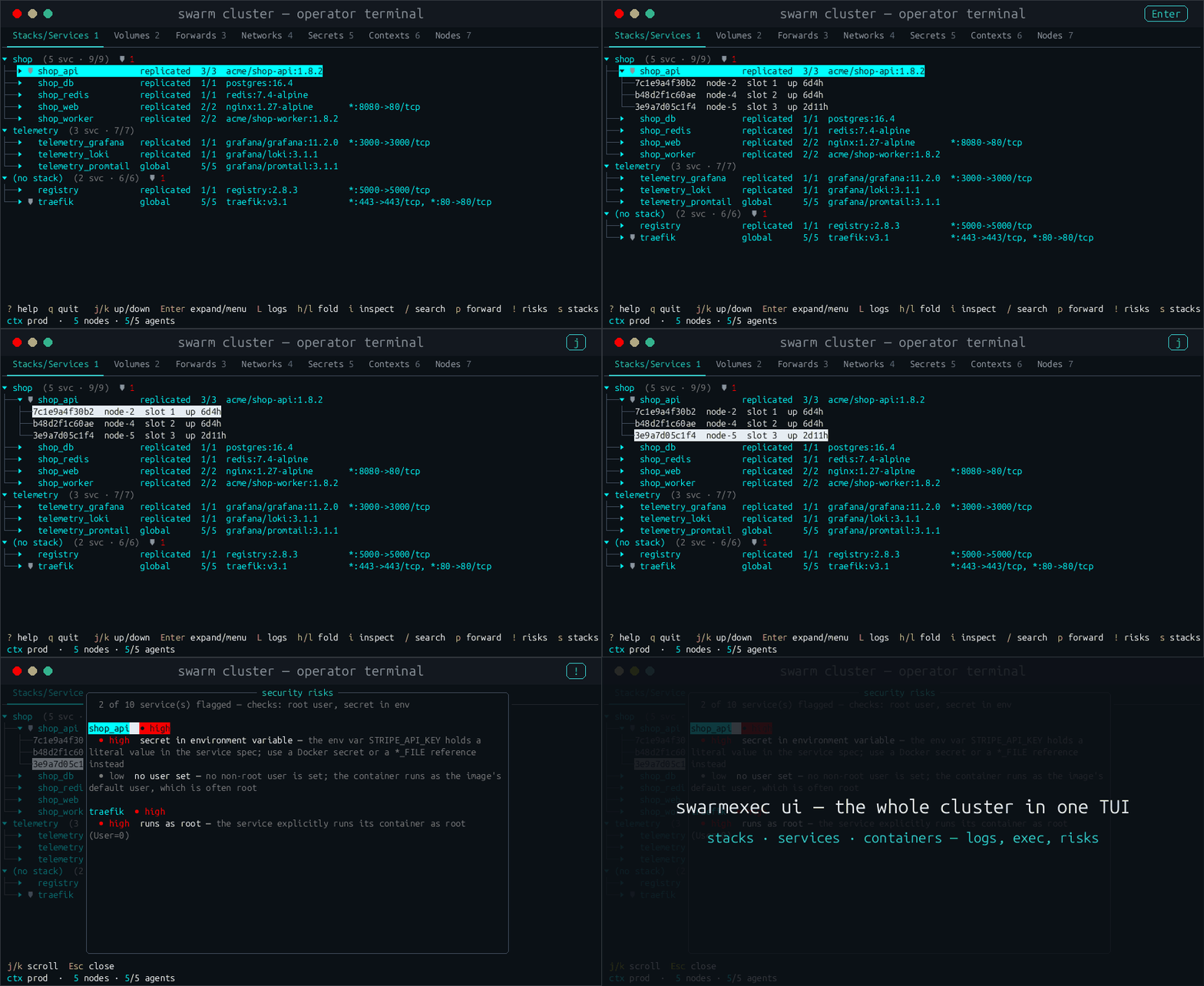
swarmexec ui has seven tabs — Stacks/Services, Volumes, Forwards, Networks, Secrets, Nodes, Configs — a context sidebar on the right, and exec, logs and port-forwarding built in. If your hands know k9s, they know the shape of it: tabs by number, / to filter, the same keys on every cluster.

  • The tree is coloured by healthcheck as well as replica count — the rule the stage above lets you try.
  • A service with a finding worth acting on carries a 🛡 in a fixed-width column, so the shields line up into a vertical scan.
  • CPU and memory markers appear at 70 % and 90 %, measured against the container's own limit when it has one.
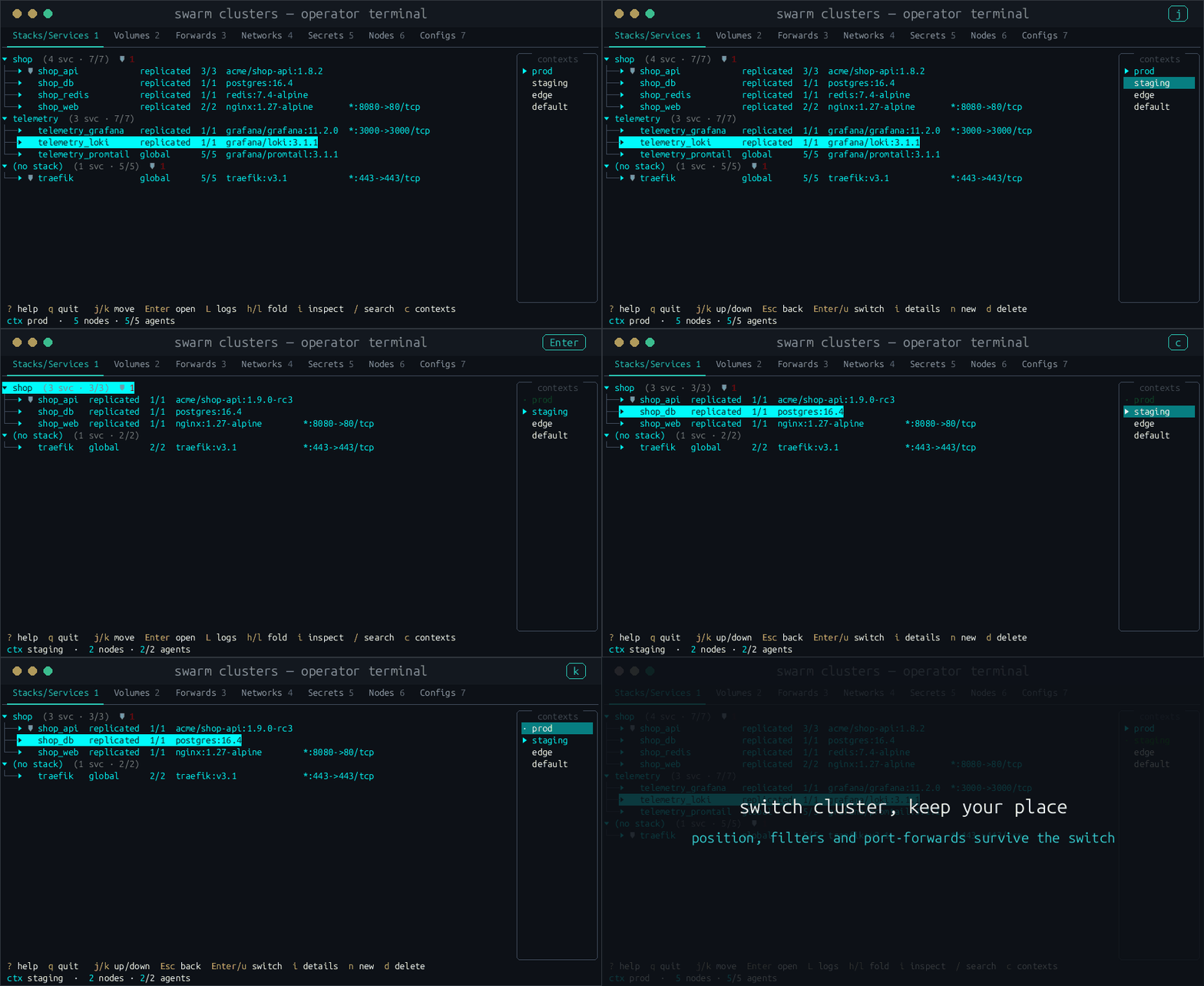
  • Switching context keeps your place, your filters and your forwards.
  • ? opens the full key reference, generated from your own keymap.

Health and usage need agents from a current release. A cluster that has not been re-rolled shows neither, rather than a guess — init --force fixes that.

The swarmexec TUI: the cluster as a tree of stacks, services and containers, a service expanded to its tasks on node-2, node-4 and node-5, and the security-risks overlay listing the flagged services.
Tab 1, expanded to tasks, with the security-risks overlay open.
The TUI with a contexts sidebar on the right: pressing c focuses it, Enter switches from the prod cluster to staging, and switching back leaves the cursor on the same service.
Switching clusters and back; the cursor stays on the same service.

How it compares

What decides between them, including the two rows where swarmexec is the wrong pick. The full comparison goes through each tool — SSH, docker contexts, Portainer, Swarmpit, lazydocker, socat tunnels and the kubectl model.

Capability swarmexec SSH + docker exec Portainer CE / BE d4s swarmcli CE / BE
Exec into a task on any node, without SSH to it ✔✖ an account per node✔ in the browserpartly over SSHpartly BE, free up to 3 nodes
Port-forward to a port published nowhere ✔✖ publish it or add a sidecar✖ Kubernetes only✔ over SSHpartly BE, free up to 3 nodes
Logs that follow a replaced container ✔––––
Several clusters in one session ✔✖✔✔✔
Content diff of a stack file against what is deployed ✔✖✖✖partly its own chart revisions
Security gate before stack deploy ✔✖✖✖✖
Deny rules per action and an audit line per operator ✔✖partly BE, free up to 3 nodes✖partly BE, free up to 3 nodes
Nothing to deploy on the cluster ✖ one agent per node✔✖ agent✔partly CE yes, BE agent
A web UI for colleagues without a terminal ✖✖✔✖✖
Cost beyond three nodes $0$0CE $0; BE from $1,045 a year (5–15 nodes)$0BE licence, price on request
Telemetry nonenone––on by default, opt-out

✔ yes · partly partly, or only in the paid edition · ✖ no · – not documented. Checked on 2026-11-19 against each project's README, documentation and pricing page (portainer.io/pricing, d4s, swarmcli.io). Portainer and swarmcli both license their paid features free of charge on a swarm of up to three nodes, which is why the cost row asks what happens beyond that. Arcane and Komodo are web platforms with Swarm support; exec and port-forward into tasks on other nodes are not documented there. Something out of date? Tell us.

Every option, tool by tool, with an FAQ →

What the scan looks for

The report's own Checked list is generated from the analyzers themselves, so a check cannot ship without appearing in what the report claims to have looked at.

Per service, from the spec the manager returned
CheckSeverityWhat it flags
docker-sockethighthe daemon socket bind-mounted in. Anything that can talk to it can start a privileged container on that node; read-only does not help, because a socket is an API, not a file.
added-capabilityhigh mediumSwarm has no --privileged, so capabilities are how a service asks for host power. Eight are high, each with its reason: ALL, SYS_ADMIN, SYS_MODULE, SYS_PTRACE, SYS_RAWIO, DAC_READ_SEARCH, NET_ADMIN, NET_RAW. Any other is medium.
host-networkhighattached to the host network: no isolation, no port mapping, and it can reach anything the node can — including services bound to localhost.
unconfinedhighseccomp or AppArmor switched off, reported separately, so a service that disables both gets two findings.
root-userhigh lowhigh when the spec pins the container to root — User=root or uid 0. Low, and not marking the service, when no user is set at all: whether that is root depends on the image's own USER.
secret-in-envhigha credential-looking key with a literal value, readable by anyone who can read the spec. *_FILE references are exempt, and the value never appears in the finding.
no-resource-limitslowneither a CPU nor a memory limit, so a runaway container can starve the node.
unpinned-imagelow:latest or no tag. A digest-pinned image is never flagged, and a registry port is not mistaken for a tag.
Per cluster, in the Markdown report
CheckSeverityWhat it flags
network-unencryptedmediumSwarm tunnels traffic between nodes over VXLAN in the clear unless the network was created --opt encrypted. Empty networks are not flagged, nor is ingress, which cannot be encrypted at all.
autolock-disabledmediumthe raft store holds every secret, every config and the cluster CA key, and its key sits on the same disk. Unreadable configuration is reported as unknown, not guessed.
agent skewhigh medium lowthe agent enforces authorization, so one older than your client may not enforce a rule the client assumes. An agent that did not answer is a gap, not a pass.
pinned-overlay-addresshigha service spec naming a literal IP from one of the swarm's overlay networks. Those addresses move whenever the network is recreated, and the service then fails with “no route to host” long after the change that caused it. Aliases survive; addresses do not.
unused-secret / -configlowstill distributed through raft and readable by anything that reaches a manager — usually a credential someone rotated and never removed.
A terminal: swarmexec security report writes a Markdown file, then pages through it — the scanned counts, the summary table of findings by severity, and the cluster findings.
swarmexec security report: the whole cluster as one Markdown file.

The report is written 0600 into directories created 0700: it names every service, network and secret together with every weakness found in it, which is a map of where to attack. Its order depends only on the findings, so two reports of an unchanged cluster differ in their timestamp alone.

The agent, honestly

It mounts the Docker socket. Isn't that what your own scan flags?

Yes, and for the same reason: whatever reaches the socket controls the node. The agent needs it to exec, read logs and forward ports on its node, as Portainer's agent does. It also mounts the node's /sys read-only, which is a far smaller thing: it reads link MTUs from it and nothing else — sysfs carries no addresses — so an overlay can be sized for the link that actually carries it. What fences the socket: it answers no request it cannot authenticate (mutual TLS, or a secret bound to the connection); a policy file can deny exec, portforward or volume actions per service, port and user; every request lands in its audit log; swarmexec down removes it again.

Why an agent rather than SSH?

So the people who need a shell in a container do not need an account on every node. The agent is the one door, it knows who came in and what they did, and it can say no per action. If you already have SSH to every node and want nothing on the cluster, d4s takes that route.

Does it phone home?

No telemetry, no licence check, no account. The client talks to your manager and your agents; the TUI also asks your images' registries whether a newer tag exists. And it asks swarmshell.dev/latest.json at most once a day whether a newer swarmexec release exists, sending nothing about you or your cluster; ui.check_updates: false turns it off (configuration). That is all the network it uses.

This website is another matter: it measures its use with Umami, which we host ourselves at stats.cloud-surfers.net — page views and clicks on the download and repository links, without cookies and without recording visits. Nothing goes to a third party. Details in the privacy policy.

Setting it up

  1. Take the binary

    $ curl -fsSL https://swarmshell.dev/install.sh | sh
    $ brew install ekrotov/swarmexec/swarmexec        # macOS, Linux
    $ scoop bucket add swarmexec https://github.com/ekrotov/scoop-swarmexec
    $ scoop install swarmexec                          # Windows

    One static binary. The install script checks it against the release's checksum and refuses what it cannot verify. Docker Engine 19.03 or newer on the manager and every node; live usage and the per-node image view want 23.0 and say so instead of failing below it.

  2. Provision the agents, once

    $ swarmexec --context prod init

    Deploys the agent as a global service — one task per node — creates a shared secret and writes the matching client config. swarmexec down takes it away again.

  3. Use it

    $ swarmexec exec web -- sh
    $ swarmexec ui

    Or put stack diff and stack deploy --check into CI, where the exit codes are the point.

Two ways to authenticate

Mutual TLS

The recommended posture. Your own CA — the project does no PKI bootstrap. The agent identifies and audits you by your certificate's CN.

Shared secret

What init sets up: one secret, no PKI. The secret itself is never sent — the client sends a proof bound to the certificate of the connection it travels on, so a server you did not verify receives nothing that works against a real agent. That beats theft and replay, not eavesdropping; for that you want a CA.

Other builds, always the latest release: linux-arm64, darwin-arm64, darwin-amd64, windows-amd64.